Best Work From Home Setup Under $1000 in 2026
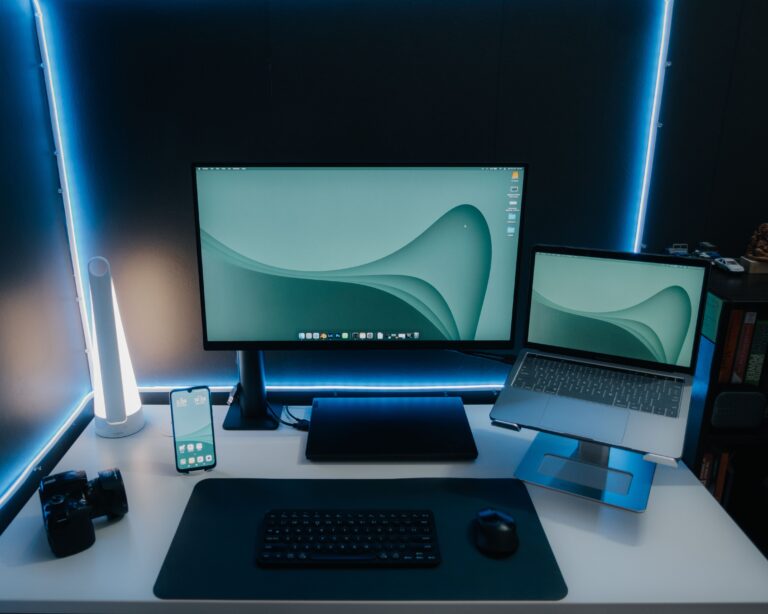
Creating an effective home office doesn’t require spending thousands of dollars in 2026, you can build a highly productive, comfortable, and professional work-from-home setup. Here we will introduce you to the best home setup under $1000.
The key is investing in the equipment that has the biggest impact on productivity:
- Ergonomic seating
- A quality monitor
- Comfortable peripherals
- Good lighting
- Reliable webcam and audio
In this guide, we’ll show you exactly how to allocate your budget and create a workspace that rivals many corporate offices.
Typical Budget Breakdown
Component
Desk
Chair
Monitor
Keyboard & Mouse
Webcam
Lighting
Accessories
Miscellaneous
Total
Budget
$150
$250
$200
$100
$75
$50
$75
$100
$1000
Start With an Ergonomic Chair
Your chair is the most important investment.
A poor chair can lead to:
- Back pain
- Neck strain
- Reduced productivity
- Fatigue
The IKEA MARKUS remains one of the most highly regarded budget ergonomic office chairs thanks to its high-back design, mesh support, and long-term comfort
For users wanting a lower-cost option, the Serta Mid-Back Office Chair provides ergonomic support and memory foam cushioning.
Recommended chairs under $300
- IKEA MARKUS
- Serta Mid-Back Office Chair
- Ergonomic Mesh Office Chairs
Related Article:
Choose a Productivity-Focused Monitor
A second screen is one of the biggest productivity upgrades you can make.
Many experts recommend a 27-inch monitor for balancing screen real estate and desk space. Modern WFH monitor guides continue to recommend 27-inch displays as an ideal size for most home offices.
Look for:
- 27-inch display
- QHD (1440p) resolution
- IPS panel
- Adjustable stand
- USB-C connectivity
Budget: $180 – $250
Recommended Monitors:
- Dell 27-inch QHD Monitor
- ASUS ProArt Series
- LG UltraFine 27-inch
- BenQ Home Office Monitors
Upgrade Your Keyboard and Mouse
You touch your keyboarded mouse thousands of times every day.
Investing in comfortable peripherals reduces strain and improves workflow.
Important features:
- Ergonomic design
- Wireless connectivity
- Multi-device support
- Quiet switches
Ergonomic keyboard and mouse combinations are consistently recommended because they improve comfort during long work sessions.
Budget: $75 – $150
Best Keyboard and Mouse Combos:
- Logitech MX Series
- Logitech MK850
- Keychron Wireless Keyboards
- Microsoft Ergonomic Keyboard
Don’t Neglect Video Call Quality
If you attend Zoom, Teams, or Google NMeet calls frequently, your webcam matters.
A dedicated webcam provides:
- Better image quality
- Improves low-light performance
- Professional appearance
Logitech’s webcam lineup continues to be a popular work-from-home choice thanks to reliable 1080p video quality.
Budget: $50 – $100
Best Webcams For Remote Work:
- Logitech Brio
- Logitech C920
- Anker PowerConf Webcam
- OBSBOT Tiny Series
Improve Your Workspace Lighting
Good lighting improves:
- Video call appearance
- Eye comfort
- Productivity
- Desk aesthetics
A simple combination works well:
- Desk lamp
- Monitor light bar
- Natural light where possible
Budget: $30 – $75
Essential Accessories Worth Buying
Small upgrades often deliver outsized benefits.
Recommended additions:
- Laptop stand
- Cable management kit
- Desk mat
- USB-C hub
- Surge protector
- Headphone stand
Home office experts frequently recommend focusing on accessories that reduce clutter and improve ergonomics rather than purchasing unnecessary gadgets.
Sample $1000 Work From Home Setup
Component
Chair
Desk
Monitor
Keyboard & Mouse
Webcam
Lighting
Accessories
Total
Budget
$300
$150
$225
$100
$75
$50
$100
$1000